EZR (Easy R) の多変量解析の結果を Excel にちまちまコピー&ペーストしていて嫌になったのでなんとかしたい。
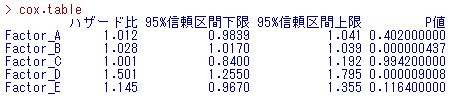
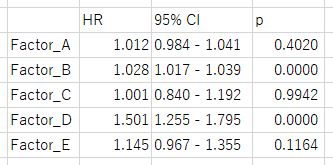
こういうのを自動的に下のようにしたい。
|
1 2 3 4 5 6 7 8 9 10 11 12 13 14 15 16 17 18 |
$ python3 Python 3.8.5 (default, Jan 27 2021, 15:41:15) [GCC 9.3.0] on linux Type "help", "copyright", "credits" or "license" for more information. >>> import pandas as pd >>> df = pd.read_clipboard() Traceback (most recent call last): File "<stdin>", line 1, in <module> File "/home/hogehoge/.local/lib/python3.8/site-packages/pandas/io/clipboards.py", line 38, in read_clipboard text = clipboard_get() File "/home/hogehoge/.local/lib/python3.8/site-packages/pandas/io/clipboard/__init__.py", line 649, in lazy_load_stub_paste return paste() File "/home/hogehoge/.local/lib/python3.8/site-packages/pandas/io/clipboard/__init__.py", line 287, in __call__ raise PyperclipException(EXCEPT_MSG) pandas.io.clipboard.PyperclipException: Pyperclip could not find a copy/paste mechanism for your system. For more information, please visit https://pyperclip.readthedocs.io/en/latest/#not-implemented-error |
……ん? Pyperclip が not implemented と例外を投げている。
これはどうもWSL2上での Pandas の bug っぽく、原因は以下のコードのようである。
|
1 2 3 4 |
if platform.system() == "Linux": with open("/proc/version") as f: if "Microsoft" in f.read(): return init_wsl_clipboard() |
Ubuntu on WSL2 の /proc/version は以下の通り。
|
1 2 |
$ cat /proc/version Linux version 5.4.72-microsoft-standard-WSL2 (oe-user@oe-host) (gcc version 8.2.0 (GCC)) #1 SMP Wed Oct 28 23:40:43 UTC 2020 |
’Microsoft’, ‘microsoft’ の case 違いでマッチせず init_wsl_clipboard() が返されないことが原因っぽいな。まあ自分で書き換えるかパッチを待つかしてもよいのだが、そもそも単純な作業であるから、pyperclip 本体を叩いた方が早いだろう。それに Pandas だと thread を作って polling させクリップボードの変更を監視させる必要があるが、pyperclip なら waitForNewPaste() を使えば一行で済む。
pyperclip.waitForNewPaste()
タイムアウトの秒数を引数に取り、クリップボードに新しい内容がコピーされるまで待機する。タイムアウトすると pyperclip.PyperclipTimeoutException を throw する。Windows の場合、フォーマットが CF_TEXT 以外(ビットマップデータやファイル)だと空文字列を返す。コピーしても前回と同じクリップボード内容になる場合は return しない。
というわけでさっくりと。
|
1 2 3 4 5 6 7 8 9 10 11 12 13 14 15 16 17 18 19 20 21 22 23 24 25 26 |
#!/usr/bin/env python3 import pyperclip timeout = 600 # 10 minutes while True: try: clip = pyperclip.waitForNewPaste(timeout) if not clip.startswith('ハザード比'): continue output = '\tHR\t95% CI\tp\n' lines = clip.split('\n') for l in lines[1:]: # ignore header factor, hr, lower_ci, upper_ci, pvalue = l.split() # throws ValueError temp_text = '{0}\t{1:.3f}\t{2:.3f} - {3:.3f}\t{4:.5f}\n'.format( factor, float(hr), float(lower_ci), float(upper_ci), float(pvalue) ) output = output + temp_text pyperclip.copy(output) except ValueError: # There's something wrong with text format. continue # ignore it except pyperclip.PyperclipTimeoutException: break except KeyboardInterrupt: break |
クリップボードが10分間変更されなかったり、CTRL-Cで割りこむと終了する。なお upper CI が ‘Inf’ の時も float() がエラーを吐かないなぁと思ったら、float(‘Inf’) は inf を返すようだ。







※コメントは最大500文字、5回まで送信できます